
Step by step
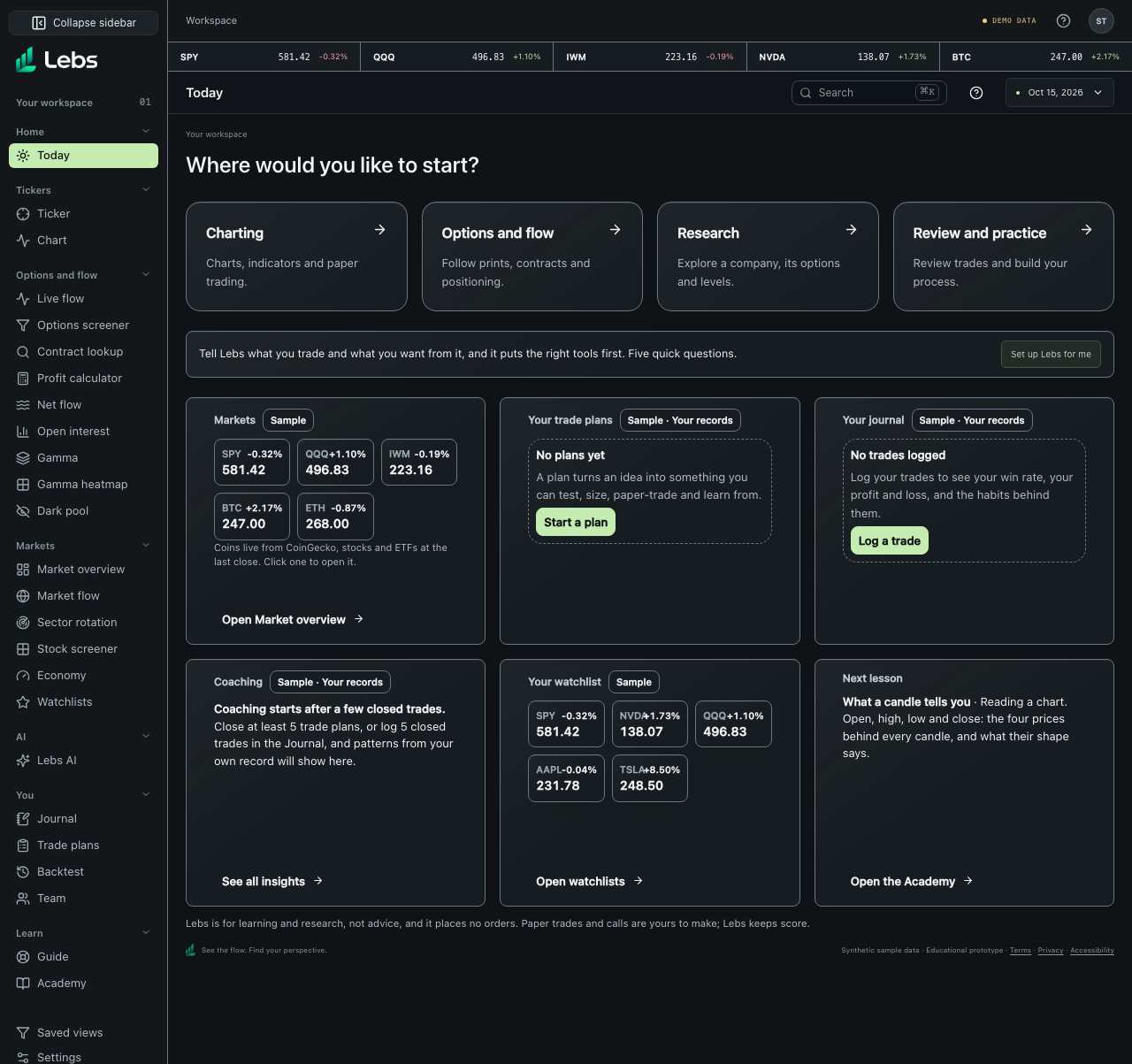
- Open Today from the Markets workspace. At the top, 'Set up for you' shows four tools picked from your goal-quiz answers, each with a reason (or a button to answer the quiz). Below it are six material Widget cards, three to a row, all the same height; a card with more than fits scrolls inside itself.
- Read the Markets card: SPY (the S&P 500 fund), QQQ (Nasdaq 100), IWM (small companies), Bitcoin and Ethereum, with the latest price and change. Click any one to open its Ticker page.
- Check 'Your trade plans': how many trades you're in, how many plans are sized and waiting, and how many drafts still need testing.
- Check 'Your journal': how many trades you closed this week, your win rate and your profit or loss.
- Read the coaching card: one pattern from your own record, such as losing more than planned when a stop is hit.
- Open the next lesson if you have ten minutes.
Every control, explained
- Set up for you
- Four tools chosen from your goal-quiz answers, each with why, plus an honest note about anything you asked for that Lebs can't do yet (such as futures prices). How: Click a tool to open it; 'Change my answers' reopens the quiz.
- Markets
- Five benchmark prices with their change, in a card of their own. How: Click a tile to open its Ticker page; 'Open Market overview' for the wider picture.
- Your trade plans
- Counts of plans by stage and your average result on closed plans, in R (multiples of what you risked). How: Click 'Open trade plans' or 'Start a plan'.
- Your journal
- Trades closed this week (Monday to Sunday), your win rate and your profit or loss after fees, from your own journal. With no trades closed yet this week it says so. How: Click 'Open the Journal' or 'Log a trade'.
- Coaching
- The first insight from your own closed plans and journal. How: Click 'See all insights' to open the full list in Trade plans.
- Your watchlist
- Live tiles for the symbols on your watchlist. How: Click a tile to open its Ticker page; 'Open watchlists' to edit.
- Next lesson
- The first Academy lesson you haven't read, from the courses your quiz answers put first (options, futures, crypto…). How: Click 'Open the Academy'.
Tips
- Use Today as a checklist: markets, open trades, this week's journal, one lesson.
Limits to know
- Stock and ETF prices are end-of-day closes on the free data plan; coins update about every 30 seconds.
- Each card says where its numbers come from: Sample in the demo workspace, or your own records. A card with nothing yet shows the one thing to do first, and a card that could not load says so and offers Try again.
Try it: Open Today, click the Bitcoin tile, then come back with your browser's back button.
Lebs is for education and research, not investment advice, and it places no orders.