

Step by step
- Open Journal and select Risk. Section tabs are shared segmented controls: Tab reaches the group, and arrow keys, Home, and End choose another section. Light, Dark, or System in Settings → Display controls the appearance.
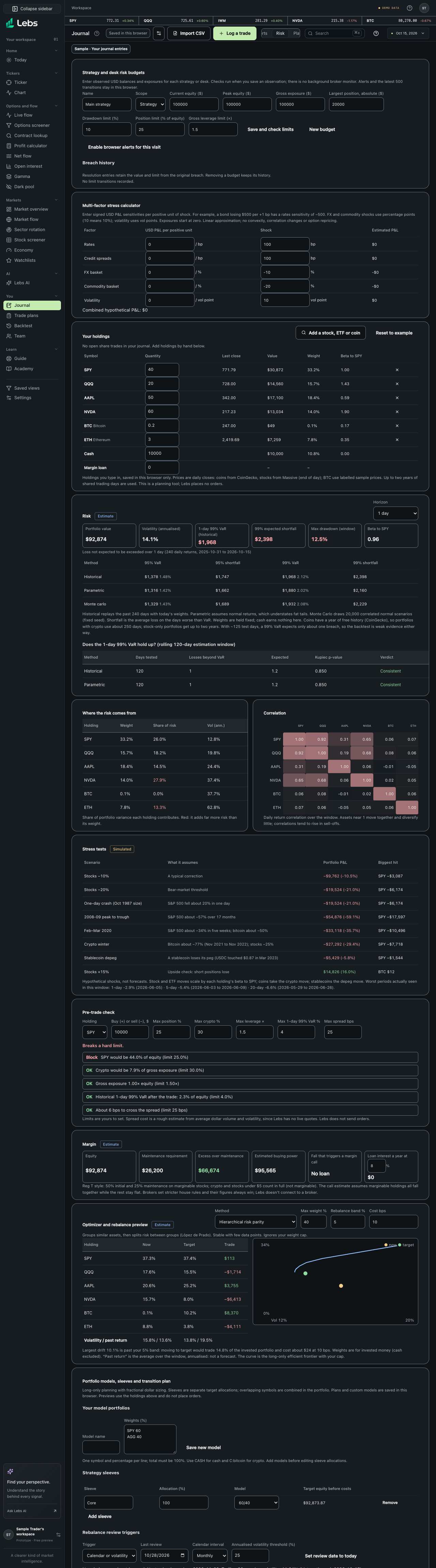
- Edit holdings, cash, and the margin loan, or use your open journal trades. Read value at risk, stress scenarios, and the efficient frontier, which uses theme colors in both appearances. Removing a saved budget or portfolio model asks for confirmation and keeps its history.
- Read the data label above the section. The public demo is Sample; personal entries remain your records. Calculated scenarios and model estimates name their assumptions. A badge applies to the numbers in its labeled chart or section; it does not make a sample observation live.
- Use the empty-state explanation when no entries match or data is missing. Add the relevant records, adjust filters, or retry loading as indicated. Missing history is never filled with invented prices. An error leaves the next useful action visible.
- Use Tab to reach actions and fields. Sheets and dialogs keep focus inside until closed, and Escape returns you to the opener. Destructive actions require confirmation; review the item name before continuing.
Every control, explained
- Holdings and risk
- Measure value at risk, stress tests, drawdowns, budgets, and portfolio plans on the holdings you enter. How: Edit holdings, cash, and the margin loan, or use your open journal trades. Read value at risk, stress scenarios, and the efficient frontier, which uses theme colors in both appearances. Removing a saved budget or portfolio model asks for confirmation and keeps its history.
- Section tabs
- Choose the Journal workspace section without changing your saved entries. How: Select Risk in the Journal header; use arrow keys inside the tab group.
- Appearance and data labels
- Readable Light and Dark surfaces, aligned numbers, and clear source context. How: Choose an appearance in Settings → Display and read the section badge before interpreting a number.
Limits to know
- Journal entries are user-entered records; Lebs does not place trades or verify broker execution. Sample records and modeled results must not be treated as live trading outcomes.
- Empty or stale source data limits the available charts and reports. Small groups can give unstable statistics; review their evidence counts.
Try it: Open Journal → Risk, inspect the holdings and risk, then switch between Light and Dark and use the keyboard to reach the same controls.
Lebs is for education and research, not investment advice, and it places no orders.