

Step by step
- Open Contract lookup. It starts on the active ticker's contracts (SPY when the sample doesn't have it).
- Type. Results appear as you type: “QQQ” lists every QQQ contract, “SPY 11/20” one expiry, “SPY 580” one strike across expiries, “SPY puts” only puts. Part of a ticker (“SP”) lists every ticker it starts.
- Choose a tab in the page header: Most active (by volume), Highest premium, Most open interest, or OI changes. Narrow with the Calls / Puts switch and the expiry chips, and star a contract to save it to a watchlist.
- Pick a contract, or type the whole thing: “SPY 11/20 580C”, “SPY 2026-11-20 580 call”, “SPY 11/20/26 580 P” or “SPY Nov 20 580C”. A date without a year means the next one after the session.
- If the expiry or strike isn't listed, Lebs says so and offers the nearest listed contract in one click.
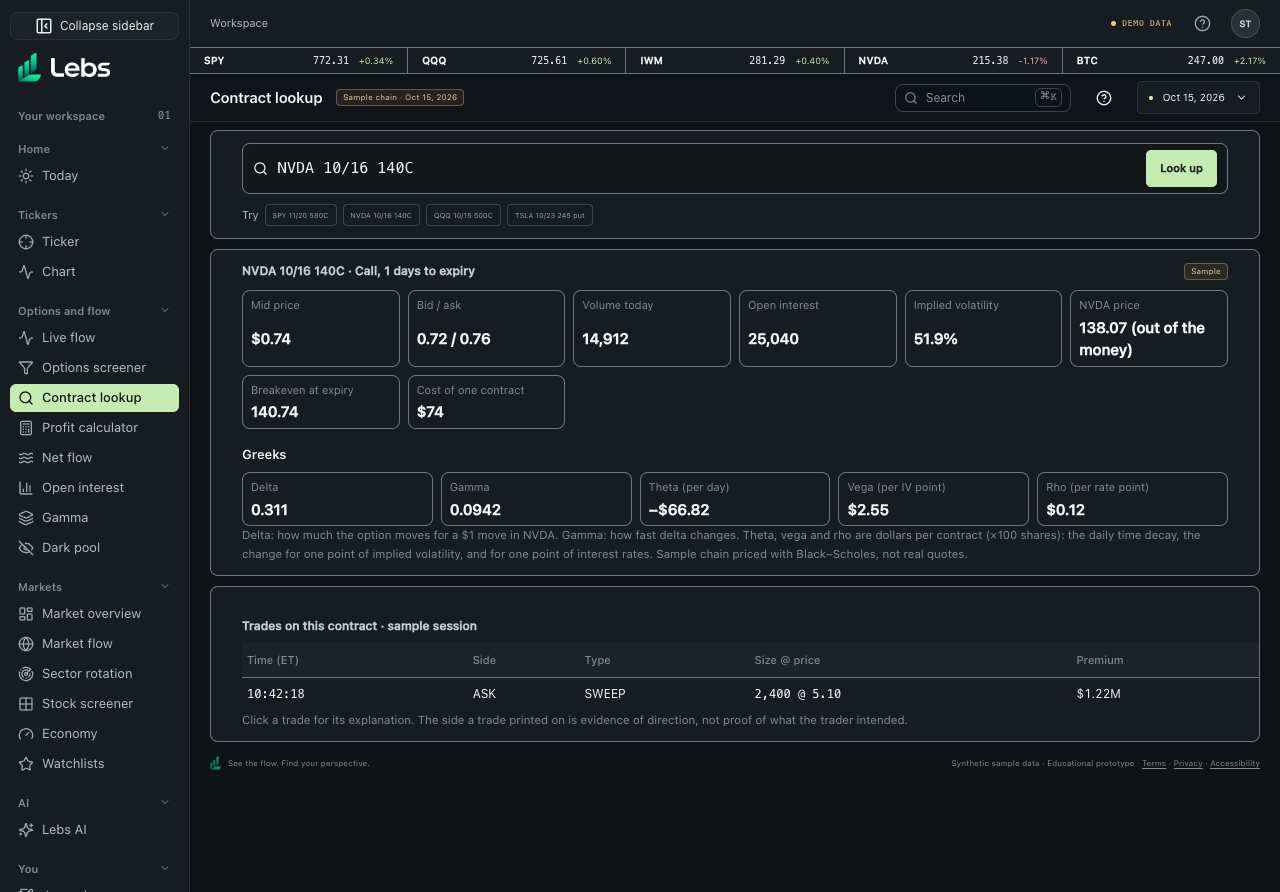
- Read the card: mid price, bid / ask, volume today, open interest, IV, the underlying price and whether the contract is in the money, the breakeven at expiry and the cost of one contract.
- Read the Greeks, then the contract's trades in the sample session. Click a trade for its explanation.
Every control, explained
- Contract box
- A ticker, part of a contract, or a whole contract in one line. How: Type; results update as you go. Messages say what didn't match.
- Examples
- A ticker, a strike search and two contracts to try. How: Click one.
- Results
- Matching contracts with bid / ask, volume, open interest, estimated premium (volume × mid × 100) and IV, ranked by activity, not investment merit. Volume above open interest shows in amber. How: Click a contract for its detail; Show more adds 50 rows.
- Most active and Highest premium
- The same results ranked by volume or by estimated premium. How: Tabs in the page header; links #contract-lookup and #contract-lookup/premium.
- Most open interest
- The contracts table across the chosen sample chains, highest open interest first, with OI change since the session before and a session picker. How: Tab in the page header; link #contract-lookup/oi.
- OI changes
- The biggest increases and decreases in open interest since the session before, with both dates, the change and the % change. How: Tab in the page header; link #contract-lookup/oi-changes. Click a contract for its detail.
- Calls / Puts and expiry chips
- Narrow the results to calls or puts and to one expiry. How: Above the results table.
- Watchlist star
- Saves a contract to one or more of your named watchlists. How: Star on each result row and on the contract card.
- Contract card
- Price, bid / ask, volume, open interest, IV, underlying price, moneyness, breakeven and cost per contract. How: Volume above open interest shows in amber.
- Greeks
- Delta, gamma, theta, vega and rho; theta, vega and rho in dollars per contract. How: Read the note under them.
- Trades on this contract
- Every sample-session trade on the contract, with side, type, size @ price and premium. How: Click a trade for its explanation.
Reading the numbers
- Breakeven at expiry
- Strike plus the mid price for a call, minus it for a put: where buying at the mid breaks even at expiry.
- Theta
- Dollars a contract loses per day as time passes, all else equal.
- Vega
- Dollars a contract gains for one point more implied volatility.
Common mistakes
- Comparing a sample trade's price with the chain's mid: the sample trades and sample chain come from different fixtures.
Limits to know
- Sample chain for Oct 15, 2026, priced with Black–Scholes. Real quotes need a licensed options feed.
- Only the ten sample tickers can be looked up.
Try it: Type “SPY 11/20 580C”, read its delta and theta, then change it to “SPY 11/20 580P” and compare.
Lebs is for education and research, not investment advice, and it places no orders.