

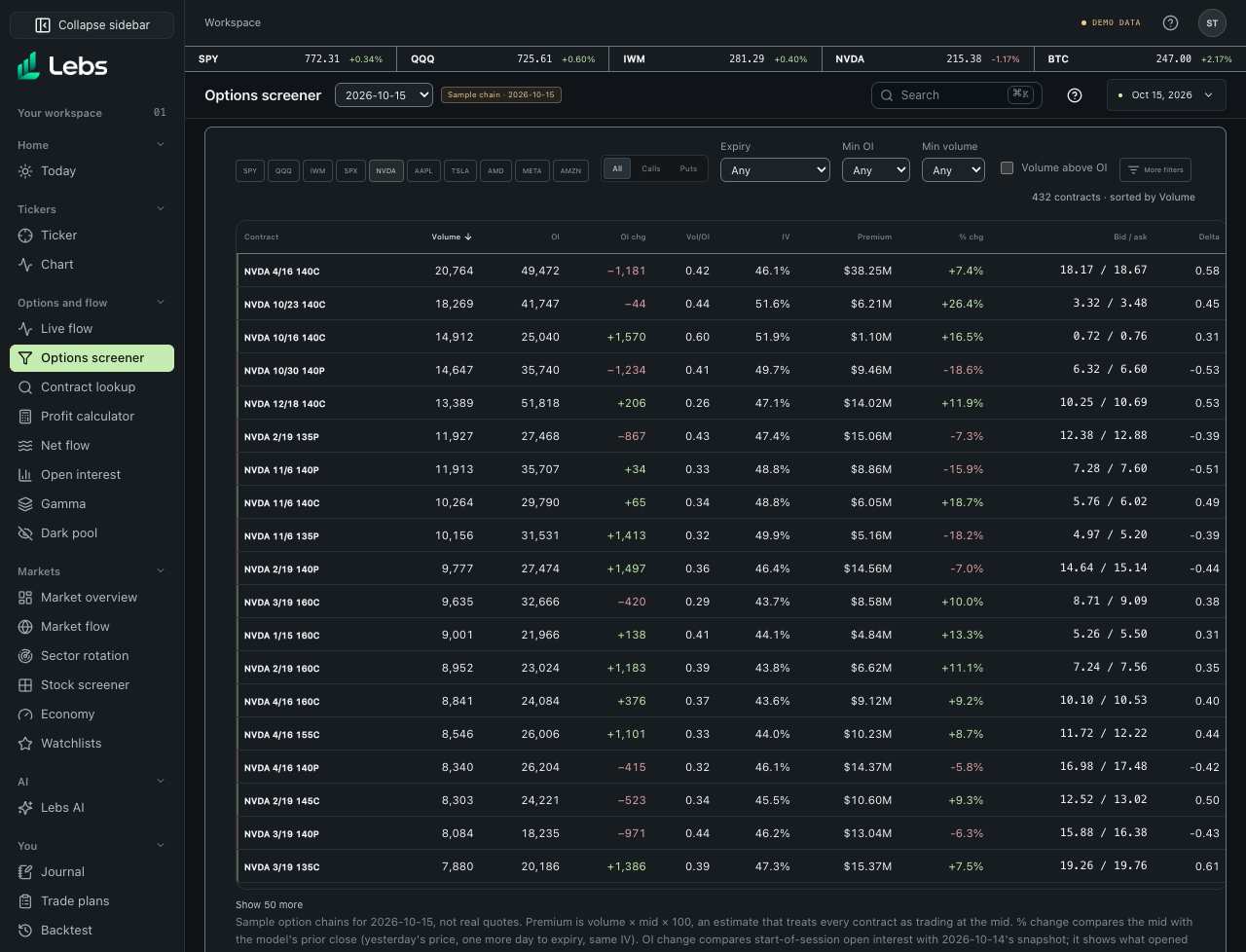
Step by step
- Open Options screener. It starts on the active ticker if the sample has a chain for it, otherwise on SPY and QQQ. Click ticker chips to add or remove symbols.
- Narrow the list: All, Calls or Puts; an expiry window (0DTE, within 7, 30 or 90 days); a minimum open interest; a minimum volume; and 'Volume above OI' for contracts that traded more than were open.
- Open More filters for ranges: expiry dates, days to expiry, strike, % out of the money, |delta|, IV, volume, open interest, volume/OI, OI change and estimated premium. Pick a past session in the page header to screen that day's chain.
- Click a column heading (Volume, OI, Vol/OI, IV, Premium, % chg) to sort by it. The count above the table says how many contracts match.
- Click a contract to open it in Contract lookup with its price, Greeks and any sample trades.
- 'Show 50 more' at the bottom adds rows.
Every control, explained
- Ticker chips
- Which sample chains to screen. At least one stays on. How: Click to toggle.
- Contract filters
- Calls or puts, expiry window, minimum open interest, minimum volume, volume above open interest; More filters adds ranges for expiry, days to expiry, strike, % out of the money, |delta|, IV, volume, open interest, volume/OI, OI change and premium. How: Combine freely; Reset filters in the drawer clears the ranges.
- Session
- Which sample session's chain to screen, newest first. How: Picker in the page header.
- Sortable columns
- Volume, OI, OI chg, Vol/OI, IV, Premium and % change. How: Click a heading; the arrow marks the sort.
- Contracts table
- One row per contract: contract, volume, open interest, OI change since the session before, volume ÷ OI, implied volatility, estimated premium, % change, bid / ask and delta. Volume above OI shows in amber; 0DTE contracts carry a tag. How: Click a contract to look it up.
Reading the numbers
- Vol/OI
- Today's volume divided by open interest. Above 1 means more contracts traded than were open: a sign of new positions, not proof.
- Premium (estimate)
- Volume × mid price × 100. It treats every contract as trading at the mid, so it's an estimate.
- % chg
- The mid price against the model's prior close: yesterday's underlying price, one more day to expiry, the same IV.
- Delta
- How much the option moves for a $1 move in the stock; also a rough chance of finishing in the money.
Common mistakes
- Reading high volume as bullish or bearish: the table doesn't say who bought or sold. Live flow shows the side of each large trade.
Limits to know
- Sample option chains for 60 sessions ending Oct 15, 2026, not real quotes. Real contracts need a licensed options feed.
- Only the ten sample tickers have chains.
- The first sample session has no session before it, so its OI change is blank.
Try it: Pick SPY, choose 0DTE and tick 'Volume above OI', then open the top contract in Contract lookup.
Lebs is for education and research, not investment advice, and it places no orders.