

Step by step
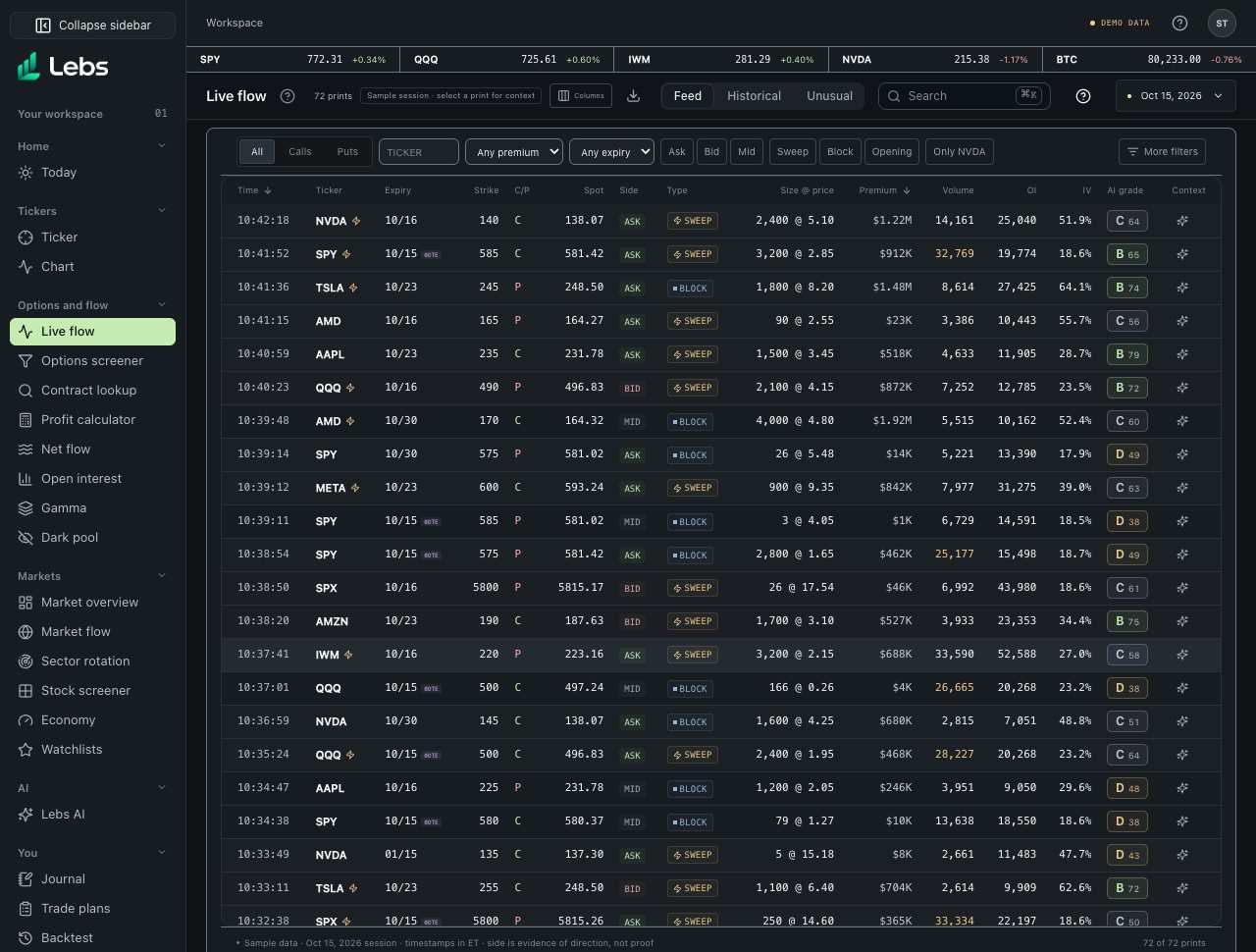
- Open Live flow. Each row is one trade (a 'print'): time, ticker, expiry, strike, call or put, the underlying price at the trade, which side of the market it hit, how it traded (sweep or block), size @ price, premium, the contract's volume so far, its open interest, implied volatility and the AI grade. Rows are tinted lightly by side.
- Use the filter bar: calls or puts, a ticker, minimum premium, days to expiry, side (ask, bid, mid) and the sweep, block and opening flags. 'Only SPY' (or whichever ticker you have selected) limits the list to that ticker.
- Open More filters for the rest, grouped Contract, Trade, Size, and Greeks and IV. Every filter you set shows as a chip under the bar; click a chip's × to remove it, or Clear all.
- Click Columns in the page header to add bid, ask, delta, gamma, theta, vega, exchange and condition codes to the table. Your choice is kept in this browser.
- Click a trade to open its explanation: what the trade means in plain words, why it might be bullish or bearish, what would make that reading wrong, Jev's read of its pattern, and its AI grade.
- Save a set of filters as a view (up to 10) from the More filters drawer, and export the filtered list as a CSV file.
- Switch tabs in the page header. Historical: pick Latest session, 5 sessions, 1 month, 3 months or a custom from–to; every Feed filter applies, and a strip shows call and put premium per session. Unusual: pick a session to see the prints scoring 60 or more and why. Interval: choose 1, 5, 15 or 30-minute buckets, a ticker and a session.
Every control, explained
- Feed
- The latest sample session with every filter below. How: The first tab; link #options-flow.
- Historical
- Any span of the 60 sample sessions, with a date column, call and put premium per session and every Feed filter. Rows load 200 at a time. How: Historical tab; link #options-flow/historical.
- Unusual
- A 0–100 score from seven named rules, each worth stated points: volume above open interest (20), premium in the ticker's top 5% over 20 sessions (20), 5× the contract's usual size (15), 7 days or less and |delta| 0.35 or less (15), a sweep at or above the ask (15), 3+ hits on the contract within 30 minutes (10), IV 5+ points above the previous session (10). 60 or more counts as unusual, and each print shows the rules it met. How: Unusual tab; the Unusual trade flag uses the same score. 'How the score works' lists the rules.
- Interval
- Per ticker and time bucket: call premium, put premium, net lean, number of prints and the largest print. Newest bucket on top. How: Interval tab; click the largest print to open it.
- Filters
- The one-row bar: calls or puts, ticker, minimum premium, days to expiry, side, the sweep/block/opening flags, Large, and 'Only' your selected ticker. How: Combine freely; chips toggle on and off.
- Large orders
- A print with $1M or more premium, or at least 10× its ticker's median print premium that session (once the ticker has five prints). Large rows are highlighted in yellow and carry a 'Large' badge. Size isn't intent: a large print can open, close, roll or hedge. How: Large chip on the bar keeps only large orders.
- Sorting
- Time, Premium, Volume and OI headings sort the table; the arrow shows the direction. Newest or largest first, then the other way. How: Click a heading; click it again to flip. Saved views keep the sort.
- Ticker
- Type a ticker, or in More filters pick tickers to include or exclude. How: Bar box, or Contract › Only these tickers / Exclude tickers.
- Calls and Puts
- Show only calls or only puts. How: The All / Calls / Puts switch on the bar.
- Expiration Date
- Pick listed expiries, or a from–to date range. How: More filters › Contract.
- Days to Expiration
- Presets on the bar (0DTE, 1–7, 8–30, 31+) or a minimum and maximum. How: Bar, or More filters › Contract.
- Strike Price
- A strike range in dollars. How: More filters › Contract.
- Percent Out of the Money
- How far the strike is from the price at the trade, in percent. Calls: (strike − price) ÷ price; puts: (price − strike) ÷ price. Negative means in the money. How: More filters › Contract: 'In the money' and 'Out of the money' at the top set the range for you; click again to clear.
- Side
- Ask, bid or mid: where the trade printed against the quote. How: Chips on the bar.
- Execution Price
- The option price the trade printed at, per share. How: More filters › Trade.
- Bid Price and Ask Price
- The quote on the contract at the moment of the trade. How: More filters › Trade.
- Trade Time
- A time-of-day window in ET, or the last 15, 30 or 60 minutes before the session's newest print. How: More filters › Trade.
- Exchange
- The options exchange the trade printed on, by full name. How: More filters › Trade.
- Trade Codes
- The raw condition codes a feed attaches to a trade (for example ISOI, an intermarket sweep order), each with its plain name. The sample uses codes modeled on the official ones. How: More filters › Trade.
- Trade Flags
- Sweep, block, split, multi-leg, floor, cross, intermarket sweep and opening (volume above open interest). A trade passes if it has any flag you pick. How: Sweep, Block and Opening on the bar; all of them in More filters › Trade.
- Premium
- Contracts × price × 100. A minimum on the bar, a maximum in More filters. How: Bar, and More filters › Size and premium.
- Contract Size
- Contracts in the trade. How: More filters › Size and premium.
- Volume
- The contract's volume so far that day, this trade included. How: More filters › Size and premium.
- Open Interest
- Contracts open at the start of the day. How: More filters › Size and premium.
- Implied Volatility
- IV at the trade, in percent. How: More filters › Greeks and IV.
- Delta
- Absolute delta from 0 to 1, so 0.3–0.5 finds both calls and puts with that sensitivity. How: More filters › Greeks and IV.
- Gamma, Theta and Vega
- Gamma per $1 move; theta as dollars of decay per share per day (absolute); vega in dollars per 1 point of volatility. How: More filters › Greeks and IV.
- Needs live data
- A filter or column the data source can't fill is shown greyed out with this label. It never quietly matches everything. How: Nothing to do; it switches on when a source has the field.
- Filter chips
- One chip for every filter set beyond the bar's own controls. How: Click × on a chip to remove it; Clear all removes them all.
- Columns
- Add bid, ask, delta, gamma, theta, vega, exchange and codes to the table. How: Columns in the page header; kept in this browser.
- Print explanation
- A plain-English reading of one trade, with the uncertainty spelled out, and Jev's read: what the trade's pattern is most consistent with (a new position, closing or rolling, a hedge, one leg of a spread) with its confidence, or 'Unclear'. Without Jev, Lebs' rules give the read and say so. How: Click a row. Side and size are evidence, not proof.
- AI grade (A–F)
- How strongly size, structure, history and market backdrop line up. Parts: conviction (30), structure (20), history (35), regime fit (15). How: Shown in the row and in the explanation.
- Saved views
- Your filter sets, saved with your account, including every filter above and the sort. How: More filters › Saved views; open from 'Saved views' in the sidebar.
- More filters
- A panel on the right with stacked sections: Contract (calls or puts, in or out of the money, expiry, days to expiry, strike), Trade (side, flags such as sweep, block and floor), Size and premium, Greeks and IV, and Saved views. How: More filters on the bar; Escape or × closes it.
- Watchlist star
- Saves the row's contract to one or more of your named watchlists. How: Star at the end of each row; a filled star means it's saved somewhere.
- CSV export
- The filtered sample trades as a spreadsheet, with spot, volume, open interest, IV, bid, ask, Greeks, exchange, codes and tags. How: Download button in the page header.
Reading the numbers
- Call / put
- A call is the right to buy 100 shares at the strike price before expiry; a put, the right to sell.
- Premium
- Contracts × option price × 100: the money paid for the trade.
- Sweep / block
- A sweep is split across exchanges to fill fast; a block is one large negotiated trade.
- Ask side / bid side
- Trading at the ask suggests an eager buyer; at the bid, an eager seller. It's evidence, not proof of intent.
- Open interest (OI)
- Contracts still open at the start of the day. It's published once a day, after the close.
- Volume above OI
- More contracts traded today than were open: a sign some trades may be opening new positions, not proof. Shown in amber.
- IV
- Implied volatility: the yearly move the option's price implies.
- Delta, gamma, theta, vega
- How the option's price moves with the stock (delta), how fast delta changes (gamma), what a day of time costs (theta) and how it reacts to volatility (vega). In the sample they're modeled with Black-Scholes.
- 0DTE
- Options that expire the same day.
- Net lean
- Calls bought at the ask and puts sold at the bid count up; calls sold at the bid and puts bought at the ask count down; mid trades count zero. Evidence of direction, not proof.
Common mistakes
- Reading a high unusual score as a signal to trade: it says a print stands out, not what happens next.
- Copying a big trade: it may be a hedge or one leg of a larger position.
- Treating an A grade as a recommendation.
- Reading volume above open interest as proof that a trade opened a position.
- Reading an ask-side sweep as proof of a bullish bet: closing trades and hedges print the same way.
Limits to know
- Sample data: 60 generated sessions ending Oct 15, 2026. Real flow and its history need a licensed options feed; a plan's history length depends on the feed.
- The unusual score compares a print with the sample's recent activity; it describes, it doesn't forecast.
- Exchanges and condition codes in the sample are generated to look like a real feed; they don't describe real trades.
- Greeks are modeled (Black-Scholes) from the sample price, IV and time to expiry.
Try it: Open More filters, set delta 0.3 to 0.5, tick the Sweep flag and Cboe Options, then add the Delta and Exchange columns and open the largest trade left.
Lebs is for education and research, not investment advice, and it places no orders.