

Step by step
- The stepper, fields, and sticky footer use shared controls in Light, Dark, or System. Tab reaches every available action; a future step explains what must be completed first. Delete opens a confirmation dialog, and recorded calls are retained.
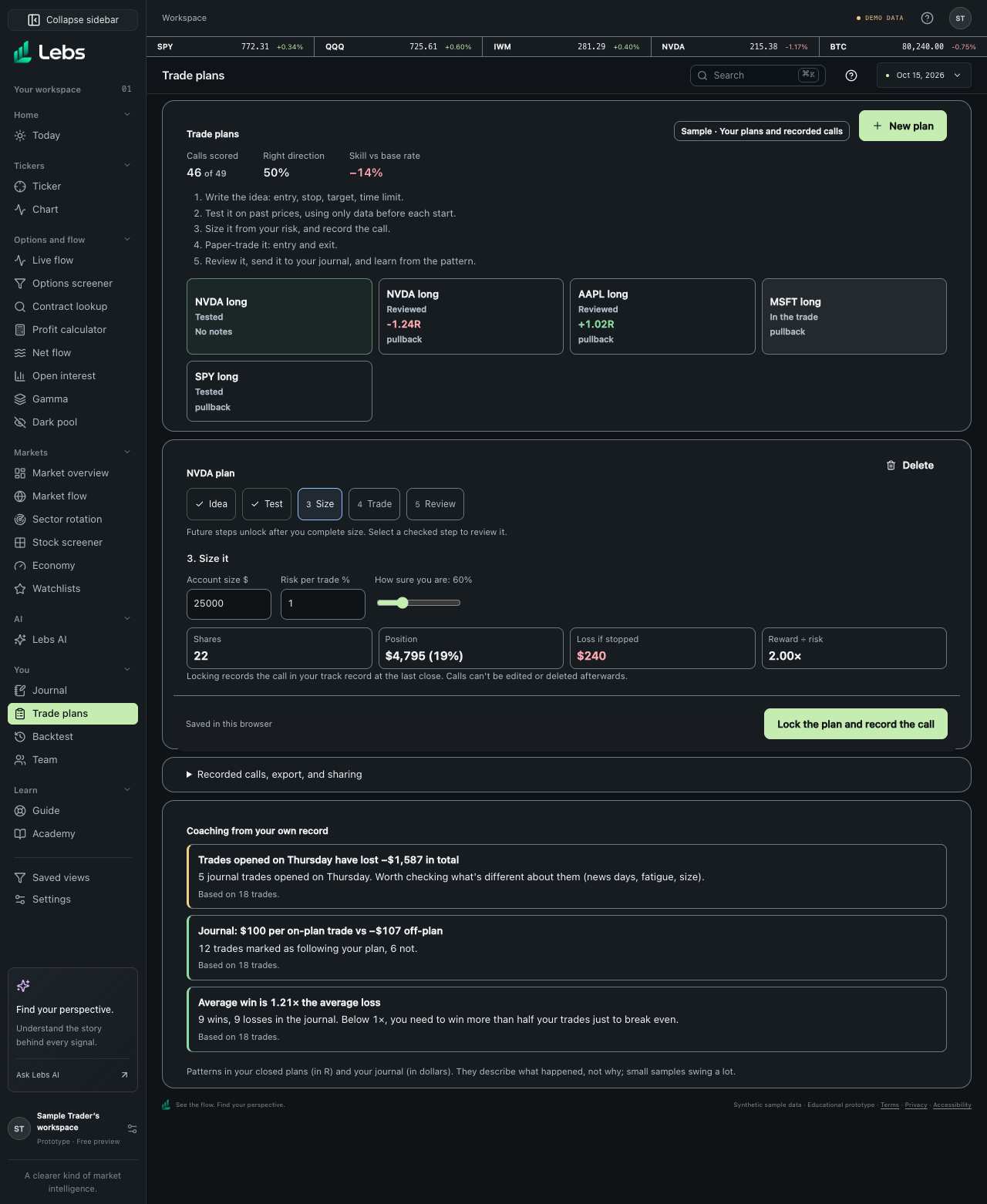
- Open Trade plans and click 'New plan'. The plan opens one step at a time: Idea, Test, Size, Trade, Review. The bar at the bottom of the plan always shows whether it's saved and the button for the next step. If that button is greyed out, the reason is written right under it.
- Step 1, the idea: pick a symbol, choose Long (you expect the price to rise) or Short (to fall). Click 'Start from the last close' to fill in an entry at the latest price with a 5% stop and a 10% target, then adjust. Set a time limit in trading days and an optional setup tag (for example 'breakout'). Write why you're taking it and what would prove you wrong. If a price doesn't make sense (for example a stop above the entry on a long), the problem appears under that field.
- Step 2, the test: click 'Run the test' in the bottom bar. Lebs goes back through past prices of the same symbol and, at many past starting points, pretends to enter with the same percentage stop and target. It shows how often the target came first, how often the stop came first, how often time ran out, and the average result, next to simply holding for the same time. When you've read it, click 'Size it'.
- Step 3, size it: enter your account size and the share of it you're willing to lose if the stop is hit (1% is a common starting point). Lebs calculates how many shares fit, the position's value, the loss if stopped and the reward compared with the risk. Read any warnings.
- Set how sure you are with the slider, then click 'Lock the plan and record the call'. The plan can no longer be edited, and a matching call goes into your record to be scored automatically. The call then shows at the top of the plan, and its result appears there once its time is up.
- Step 4, paper trade: click 'Enter at the last close' in the bottom bar. While you're in, the plan shows the current paper profit or loss. When you exit, enter the exit price and why (target, stop, time limit or closed early) and click 'Close the trade'.
- Step 5, review: answer 'Did you follow the plan?', write what went right and wrong, and click 'Add to Journal'. Your coaching list at the bottom updates as you close more plans.
Every control, explained
- Track record summary
- The top row of Trade plans: how many of your calls have been scored, how often you called the direction right, and your skill against the base rate. It counts every call, including ones made outside plans. How: Read only. It updates when a call's time is up and it's scored.
- Recorded call
- Inside a locked plan: the call it recorded (direction, time limit, how sure you were, and the entry price and date) and, once its time is up, whether it was right and its Brier score next to the base rate's. How: Read only. Calls can't be edited or deleted, so this always shows what you said before the outcome.
- Stepper
- Idea, Test, Size, Trade, Review: the plan's five steps. A tick means the step is finished; the highlighted step is the one on screen. How: Click a finished step to go back to it. Steps you haven't reached yet can't be opened.
- Next-step bar
- The bar at the bottom of the plan: whether your changes are saved (to your account, or in this browser), and the button for the step's next action. Saved waits for the actual write; a failed save shows its reason and Retry save. How: It stays on screen as you scroll. When the button is greyed out, read the line under it: it says what to fix, for example 'Put the stop below the entry for a long.' Keep the page open if saving fails, fix the connection or storage issue, and choose Retry save.
- Entry, stop, target
- Where you get in, where you admit you're wrong, and where you take profit. How: Type prices in dollars. For a long, the stop must be below the entry and the target above; the reverse for a short. A price in the wrong place is flagged under its field.
- Time limit
- How many trading days you give the idea before closing anyway. How: 1 to 252 days.
- Past-price test
- Checks the same stop/target percentages from many past starting points using only data available at each start. How: Click 'Run the test'. Change the plan and it resets.
- Sizing
- Shares = account × risk % ÷ distance to the stop. How: Enter account size and risk %; read shares, position %, loss if stopped and reward ÷ risk.
- Warnings
- Reward less than 1.5× the risk, a position over 25% of the account, a position larger than the account, or a stop so far away that not one share fits. How: Fix the plan rather than ignoring them.
- Lock and record
- Freezes the plan and adds its call to your record. The call can't be edited or deleted afterwards. How: Click 'Lock the plan and record the call' on the Size step. It needs a valid plan and at least one share in the risk budget.
- Paper trade
- A pretend entry and exit to see how the plan plays out. No real money, no broker. How: Enter at the last close; close with an exit price and reason.
- Review and Journal
- Your result in R, days held, whether the stop was respected, your notes, and a copy in the Journal. How: Fill in the review and click 'Add to Journal'.
- Coaching
- Patterns in your own closed plans and journal: average result, stops not respected, winners closed early, trades held too long, on-plan vs off-plan, best and worst setups, weekdays that lose money, average win vs average loss. How: Appears after 5 closed plans or 5 closed journal trades. Each insight says how many trades it's based on.
Reading the numbers
- R
- Your result divided by what you planned to risk. +2R means you made twice your planned loss; −1R means you lost exactly what you planned.
- Reward ÷ risk
- Distance to the target divided by distance to the stop. 2× means the target is twice as far as the stop.
- Target first / stop first / time ran out
- In the past-price test, which happened first from each past start.
- Just holding the same time
- What buying and holding for the time limit would have made, in R. If the plan doesn't beat it, the stop and target aren't adding anything.
Tips
- Decide the stop before the target: it's the part that protects you.
- Risk the same small percentage on every trade so one loss never hurts much.
- Write what would prove you wrong; it makes the exit easier.
Common mistakes
- Moving the stop further away once the trade goes against you.
- Sizing by how confident you feel instead of by the stop distance.
- Ignoring the 'just holding' comparison: a plan that does no better than holding is just holding with extra steps.
Limits to know
- The test and the review use daily closing prices, so moves within the day aren't seen.
- A few dozen past samples is weak evidence, and the past doesn't guarantee the future.
- Plans are saved with your account (or in this browser for the test login). Nothing is sent to a broker.
Try it: Make a plan on SPY: long, start from the last close, 20 days, run the test, size it with a $25,000 account at 1% risk, lock it, enter, then close it at the stop and review it.
Lebs is for education and research, not investment advice, and it places no orders.