

Step by step
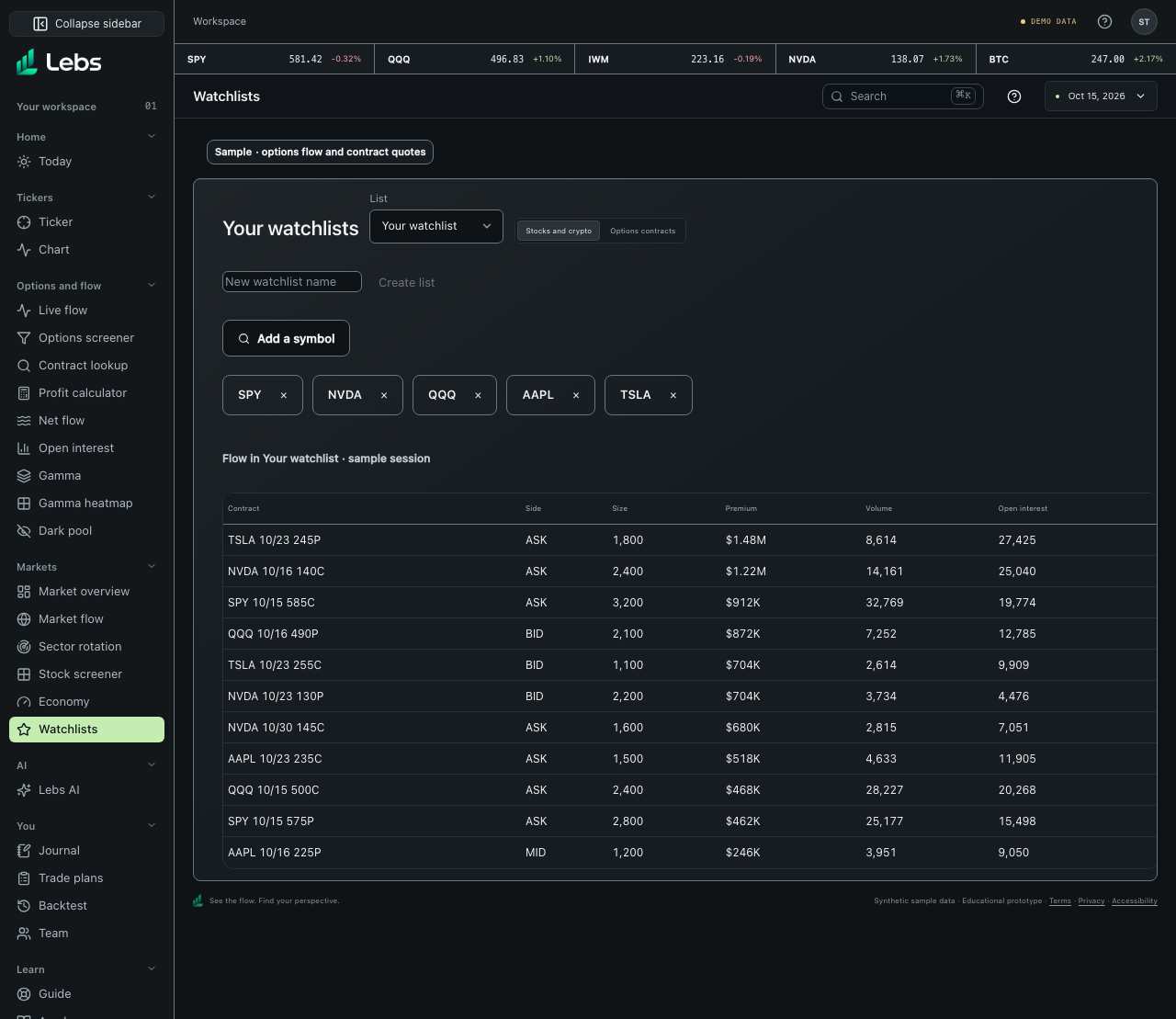
- Open Watchlists and choose a named list, or create one. Add and remove symbols in Stocks and crypto.
- Switch to Options contracts to see contracts saved from Contract lookup, with sample chain quotes. Below, see sample options trades for the selected list.
- In the Trading chart, the side panel has grouped watchlists (indices, stocks, crypto) that you can edit and fold away.
Every control, explained
- Workspace watchlist
- Named symbol and contract lists, saved to your workspace. How: Choose or create a list, then add or remove its symbols or saved contracts.
- Flow in your watchlist
- Sample options trades for the selected symbols or contracts. How: Read below the list.
- Chart watchlists
- Groups of any stocks, ETFs or coins next to the chart. How: Trading chart side panel: add, remove, fold groups.
Tips
- Keep 10–20 symbols you understand well.
Limits to know
- Use Settings → Display → Reduce transparency for opaque surfaces.
- The sample flow covers the sample session's instruments; chart watchlists accept other symbols too.
- An empty list prompts you to add a symbol or save a contract; for symbols the sample session does not cover, the flow list says there are no sample prints.
Try it: Add NVDA to a named list, then inspect the sample flow below it.
Lebs is for education and research, not investment advice, and it places no orders.